
What is Paper Trading in Algo Trading? (And Why You Should Never Skip It)
Wondering if your trading strategy actually works without risking your hard-earned capital? Dive into the ultimate guide on Paper Trading in Algo Trading (forward testing). Learn why backtesting alone isn’t enough, how live simulation bridges the gap between theory and reality, and how to test your strategies risk-free using top platforms like AlgoRooms and uTrade Algos.
What is Paper Trading (Forward Testing) in Algo Trading?
- Core Definition: Paper trading—also known as forward testing or virtual trading—is the process of running your automated or rule-based trading strategy on live, real-time market data using simulated (virtual) money instead of real capital. By integrating Paper Trading in Algo Trading, you can evaluate system performance under actual live conditions.
- How It Differs from Backtesting: Clarify that while backtesting evaluates how your rules would have performed on historical charts (which can suffer from curve-fitting or hindsight bias), forward testing tests how your logic reacts to live, unseen market ticks, sudden volatility spikes, and real-time order triggers without putting a single rupee at risk.
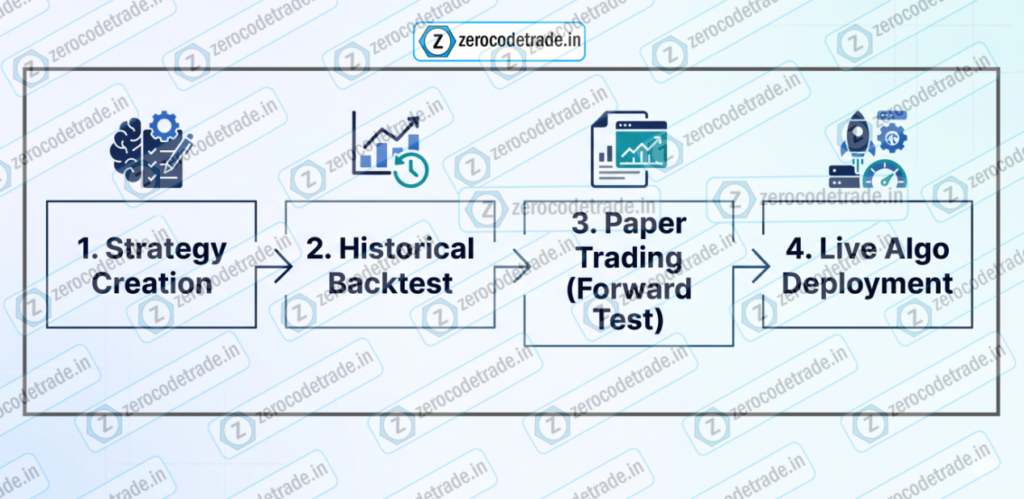
- The Golden Rule of Algo Deployment: Highlight the standard professional workflow: Build Strategy 🡪 Backtest 🡪 Paper Trade (Forward Test) 🡪 Go Live.
Author’s Advice & Important Risk Note
- High Risk Warning: Stock and options trading are high-risk endeavors that can result in significant financial loss. Before committing real capital to the live market, it is essential to start with backtesting, forward testing, and paper trading to validate your strategy.
- Do Your Own Due Diligence: Do not blindly trust any single broker, platform, influencer, or social media channel. The trading landscape is full of noise; your priority should be mastering the basics of market mechanics at your own pace.
- Educational Purpose Only: The insights shared on this website—including our analysis—are for informational and educational purposes only.
- Not SEBI Registered: We are not SEBI-registered advisors, and this content is not a recommendation to trade. Always perform your own independent research and testing before entering live markets.
Why Should You Never Skip Paper Trading? (Key Advantages)
- Exposes Over-Optimized (“Curve-Fitted”) Strategies: A strategy that shows a 90% win rate in historical backtests often fails when exposed to live market noise. Forward testing acts as a reality check.
- Validates Live Execution & Logic Bugs: Ensures your entry conditions, stop-loss triggers, trailing stop-losses, and universal exit times fire accurately during live market hours—catching missing conditions or incorrect timeframes before real money is involved.
- Tests Strategy Behavior Across Market Regimes: Helps you observe how your setup handles high-volatility events (like RBI policy days, budget sessions, or weekly expiries) versus sideways choppy days.
- Builds Confidence & Eliminates Emotional Interference: Watching your rules play out consistently over 20–50 simulated trades builds trust in the system, preventing panic-exits when you transition to live capital.
- Zero Financial Risk: Lets beginners master platform interfaces, position sizing, and order management without paying “tuition fees” to the market in real losses.
What is Backtesting in Algo Trading? (And Why It’s Your First Line of Defense)
Before you ever risk a single rupee in live markets—or even before you put a strategy into Paper Trading in Algo Trading—every algorithmic trading journey begins with Backtesting.
Backtesting is the process of testing a trading strategy using historical market data to see how it would have performed in the past. By running your specific entry conditions, exit rules, stop-losses, and target profits through months or years of past price charts (such as Nifty 50 or Bank Nifty candles), backtesting gives you an instant simulation of your strategy’s historical profitability, win rate, and risk profile. For further insights on structuring your automated workflows, check out our guide on How to Create Algo Trading Strategy in Zerodha Streak.
Why Is Backtesting Important Before Paper Trading?
Many beginner traders make the mistake of jumping straight into live markets or paper trading without running a historical backtest first. Here is why backtesting must always serve as the foundation of your algo workflow:
- Saves Time and Capital: Instead of waiting weeks in paper trading to realize a strategy has a fundamentally flawed entry condition, backtesting exposes those flaws in seconds across years of historical data.
- Filters Out Bad Ideas Instantly: If a moving average crossover or indicator strategy shows a net loss over a 3-year historical test during different market regimes (bull, bear, and sideways), you know immediately that it needs modification before wasting time forward-testing it.
- Provides a Baseline Expectation: Backtesting gives you baseline metrics—such as your expected win rate, maximum drawdown (max loss), and risk-to-reward ratio—so you know what normal performance looks like.
Key Advantages of Backtesting
- Objective Rule Verification: Algorithmic backtesting eliminates human emotion, showing you cold, hard data on whether your trading rules actually have a mathematical edge.
- Speed and Efficiency: Platforms like AlgoRooms and uTrade Algos can process thousands of historical candles and execute hundreds of past trades in less than a minute. You can also explore Best No-Code Algo Trading platforms for Beginners to see how modern tools streamline this process.
- Risk Evaluation: It helps you identify your strategy’s Maximum Drawdown (Max DD)—the largest peak-to-trough drop in capital—so you can decide if you can psychologically and financially handle those drawdowns.
- Easy Strategy Optimization: You can quickly tweak variables (like changing an EMA 9/21 crossover to EMA 20/50, or adjusting your Stop Loss from 1% to 2%) and instantly see how historical results change.
Disadvantages and Limitations of Backtesting (What to Watch Out For)
While backtesting is essential, experienced algo traders know it is not a crystal ball. Keep these limitations in mind:
- Curve-Fitting (Over-Optimization): If you tweak your strategy parameters so perfectly that it yields a 95% win rate on past data, it will almost certainly fail in live markets. This is called curve-fitting or over-optimization. Past success does not guarantee future results.
- Slippage and Brokerage Ignored: Standard backtests often assume you get filled at the exact historical price. In reality, market orders experience slippage (price gaps), and transaction costs (brokerage, GST, STT, exchange turnover charges) can turn a backtested winner into a net loser if ignored. To understand cost implications thoroughly, read our detailed analysis on the Cost of Algo vs. AI Trading: Why Should you Start with Rule-Based Bots.
- Black Swan Events: Historical data may not include unprecedented macroeconomic shocks, sudden regulatory changes, or flash crashes that can behave entirely differently than past data patterns.
The Golden Rule: Why Backtesting Must Precede Paper Trading
Think of backtesting and paper trading as a two-stage rocket launch:
- Stage 1: Backtesting is the “Design & Blueprint Phase.” It uses historical data to prove that your strategy logic has theoretical merit and a positive expectancy over time.
- Stage 2: Paper Trading (Forward Testing) is the “Wind Tunnel Phase.” Once backtesting approves the blueprint, paper trading tests how that strategy handles live, real-time market noise, latency, emotional discipline, and live order execution without risking real money.
Algorooms & uTradeAlgos Platforms for Paper Trading (Overview)
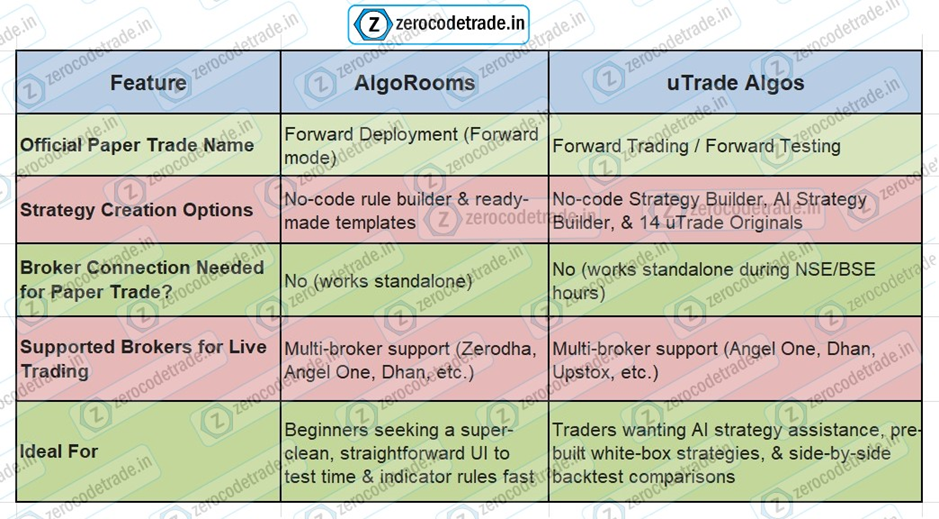
- AlgoRooms: A clean, beginner-friendly no-code algo platform for Indian equity, futures, and options traders. It calls paper trading Forward Deployment and combines templates, backtesting, and simulated live execution in one simple dashboard without requiring a broker connection for forward tests.
- uTrade Algos: An AI-powered, multi-asset algo trading platform featuring a visual Strategy Builder, uTrade AI Strategy Builder, 14 white-box uTrade Originals (like Brahmastra Nifty & Sensex), historical backtesting, and a standalone Forward Trading paper-trading engine.
How to Do Backtesting and Paper Trading in AlgoRooms (Step-by-Step)
Note for readers: On AlgoRooms, paper trading is labeled Forward Deployment (or Forward mode). Because AlgoRooms integrates strategy building, backtesting, and deployment into a single dashboard, you can switch any saved strategy from historical backtesting to live simulated forward testing in one click.
Step 1: Log In and Build or Select Your Strategy
- Log in to your AlgoRooms account (algorooms.com).
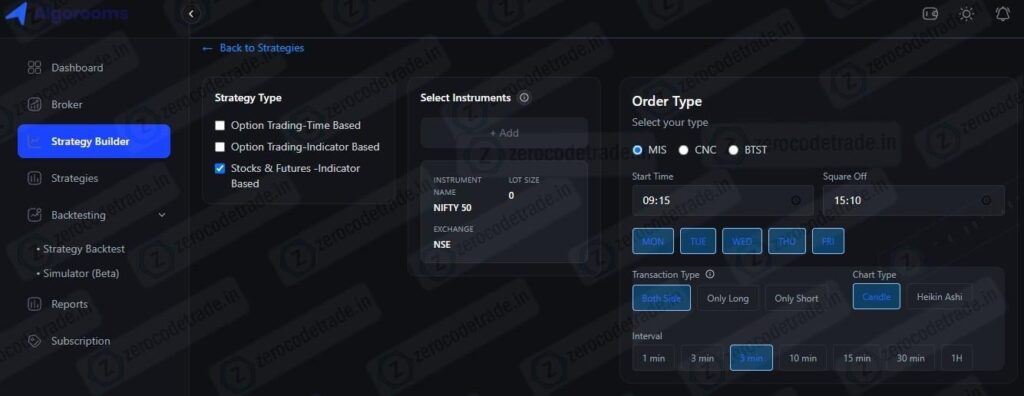
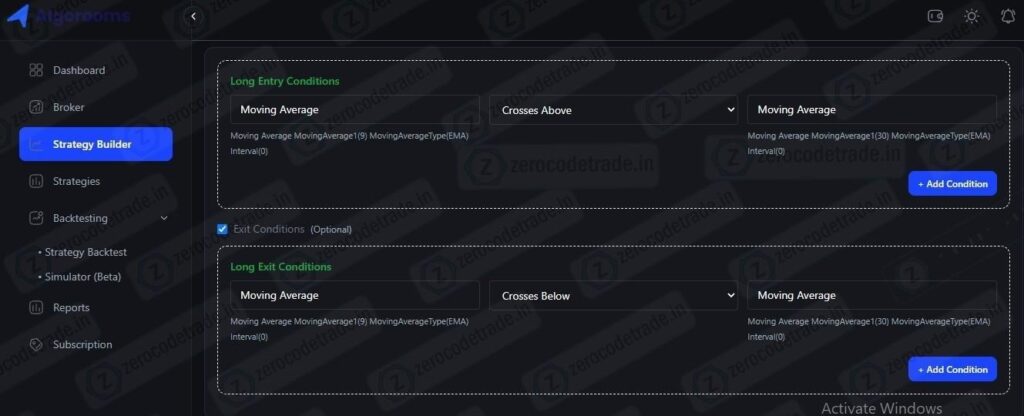
- Go to the Strategy Builder (or pick a ready-made template from Strategy Templates) to create a time-based options strategy or an indicator-based equity/F&O setup.
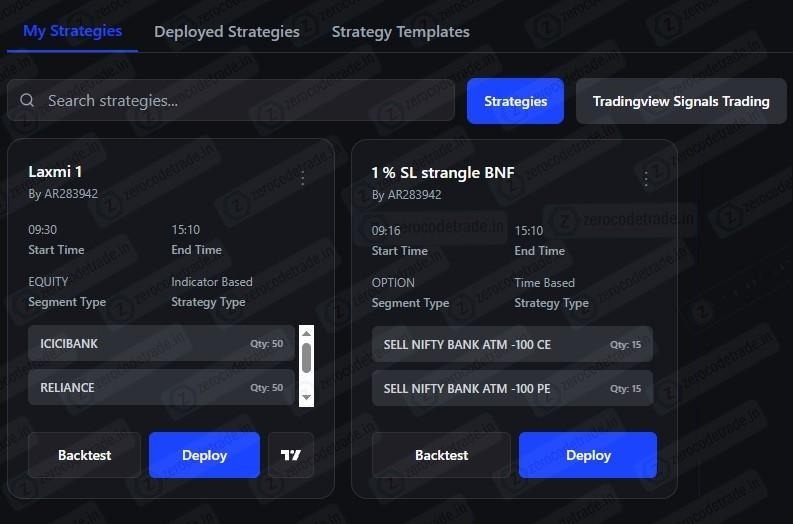
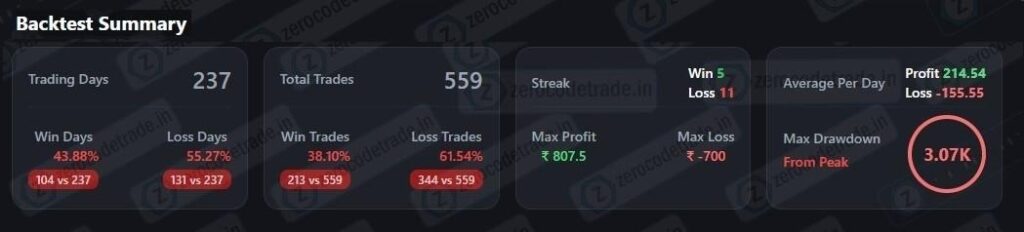
- Click Backtest to run a quick historical check on your entry rules, Stop Loss, and Target Profit before deploying.
Step 2: Click Deploy and Select “Forward” (Paper Trading) Mode
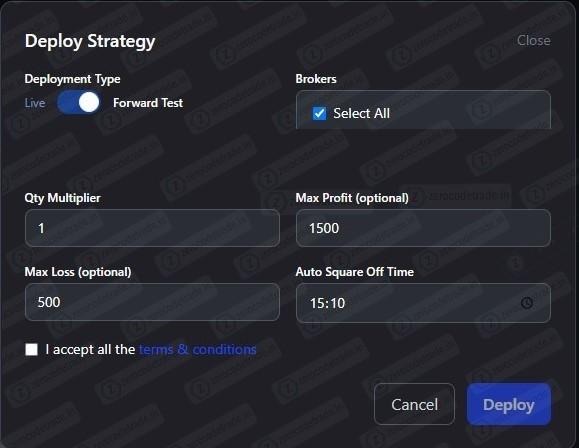
- From your strategy card or backtest results screen, click the Deploy button.
- In the deployment settings window, choose Forward (instead of Live) as your deployment mode, set your lot/quantity multiplier (e.g., 1x), and confirm the deployment.
Step 3: Monitor Live Simulated P&L and Execution Logs
- Navigate to the Deployed / Monitoring Dashboard in AlgoRooms.
- During live market hours, AlgoRooms continuously monitors live market ticks, triggers virtual entries and exits automatically when your conditions match, and displays real-time Simulated MTM (Mark-to-Market), order timestamps, and Execution Logs.
How to Do Backtesting and Paper Trading in uTrade Algos (Step-by-Step)
Note for readers: uTrade Algos (utradealgos.com) is an AI-powered, no-code algorithmic trading platform built for Indian retail traders. On this platform, paper trading is officially called Forward Testing (or Forward Trading). It allows you to build custom equity or options strategies, test them against historical market data, and run them in live NSE/BSE market hours with zero financial risk before connecting a broker account. For strategies driven by technical indicators, you can also reference our tutorial on Is RSI Algo Trading Better Than AI Bots?.
Step 1: Log In and Open the uTrade Strategy Builder
- Visit utradealgos.com and log in to your account using your registered email ID or phone number.
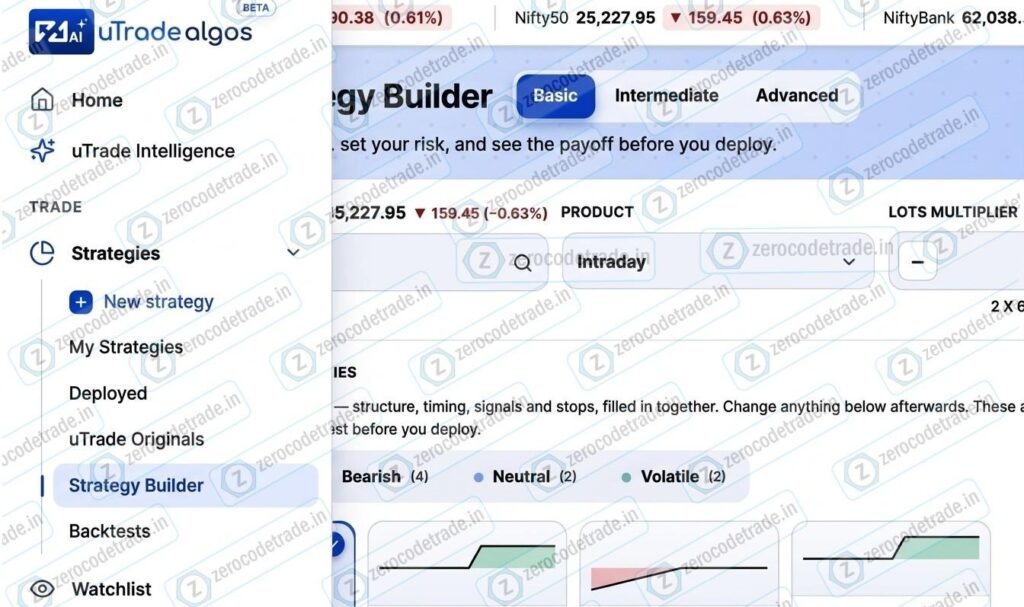
- Once you reach the main dashboard, look at the left-hand navigation sidebar, click on Strategies (or Strategy), and select Strategy Builder.
- This opens the interactive Strategy Builder workspace on the right side of your screen, where you can design rules without writing a single line of code.
Step 2: Configure Symbol, Entry/Exit Rules, Stop Loss & Save
- Choose Symbol, Product & Lot Multiplier: At the top of the builder, select the market index or stock you want to trade (such as Nifty 50, Nifty Next 50, Nifty 200, or Bank Nifty), set the product type to Intraday (selected by default) or Carry Forward, and define your lot multiplier.
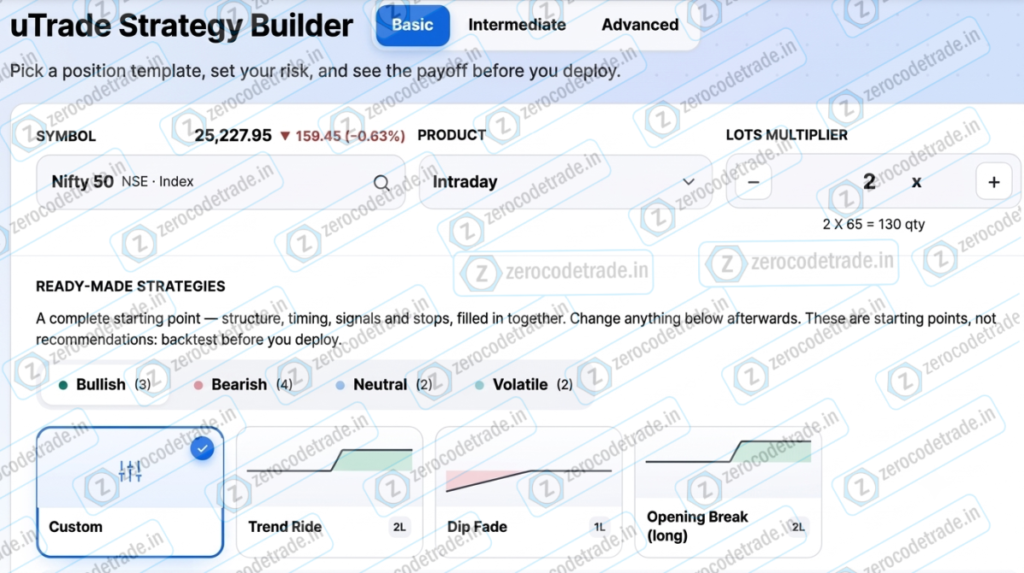
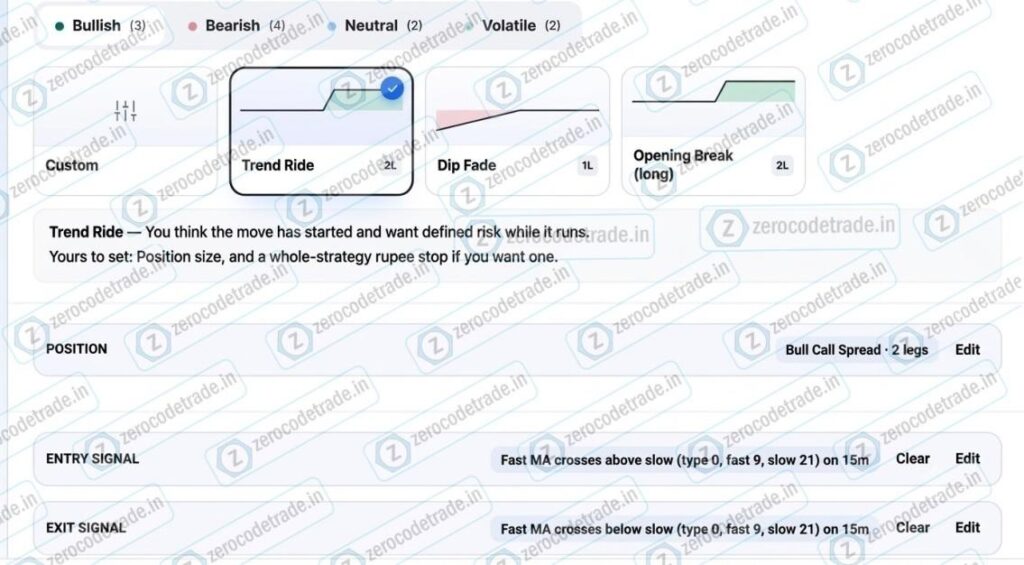
- Pick a Ready-Made Template or Customize Signals: Scroll down to choose from ready-made position/indicator templates or build your own custom setup. Review and edit the Entry and Exit conditions (such as indicator crossovers, momentum triggers, or entry/exit timings) to match your trading plan.
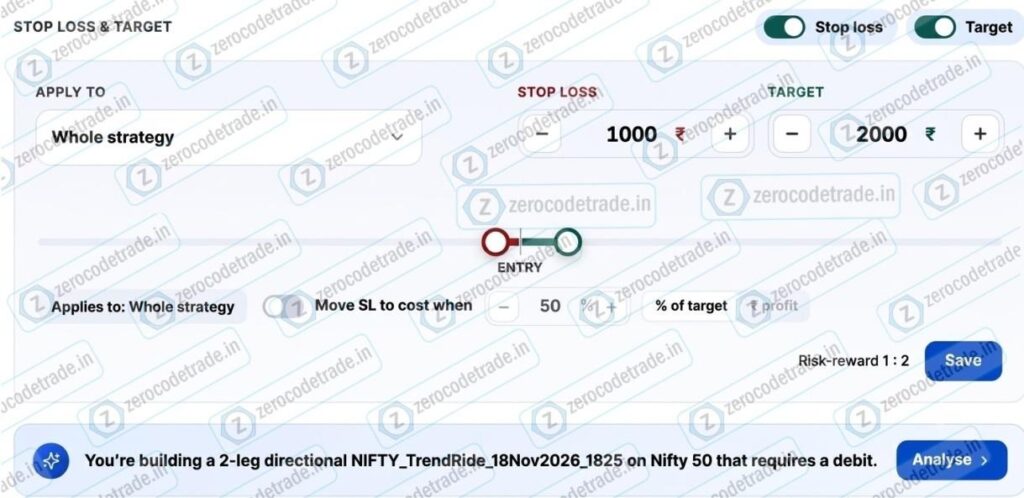
- Set Stop Loss and Target Profit: Scroll further down to the risk management section and enter your Stop Loss (SL) and Target Profit (TP) parameters (at either the strategy level or individual leg level) to cap your downside automatically.
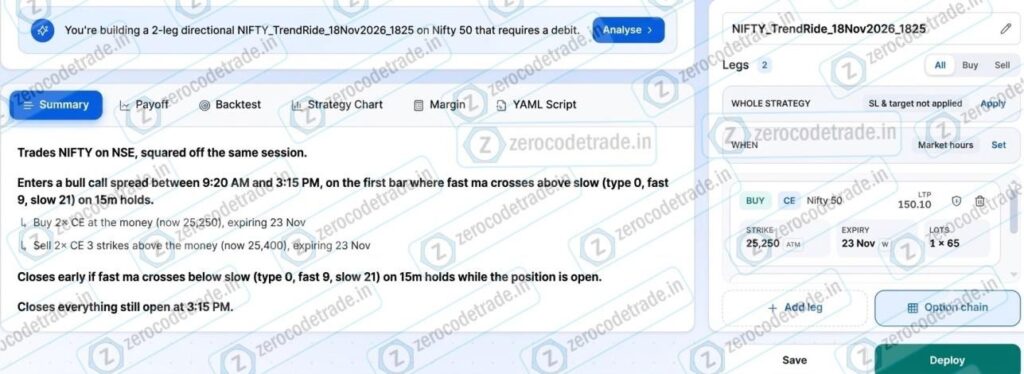
- Review and Save Your Strategy: Double-check your complete strategy summary—including payoff metrics, margin estimate, and risk rules—and click the Save button so your strategy is stored for testing.
Step 3: Backtest Your Custom Strategy Across Historical Durations
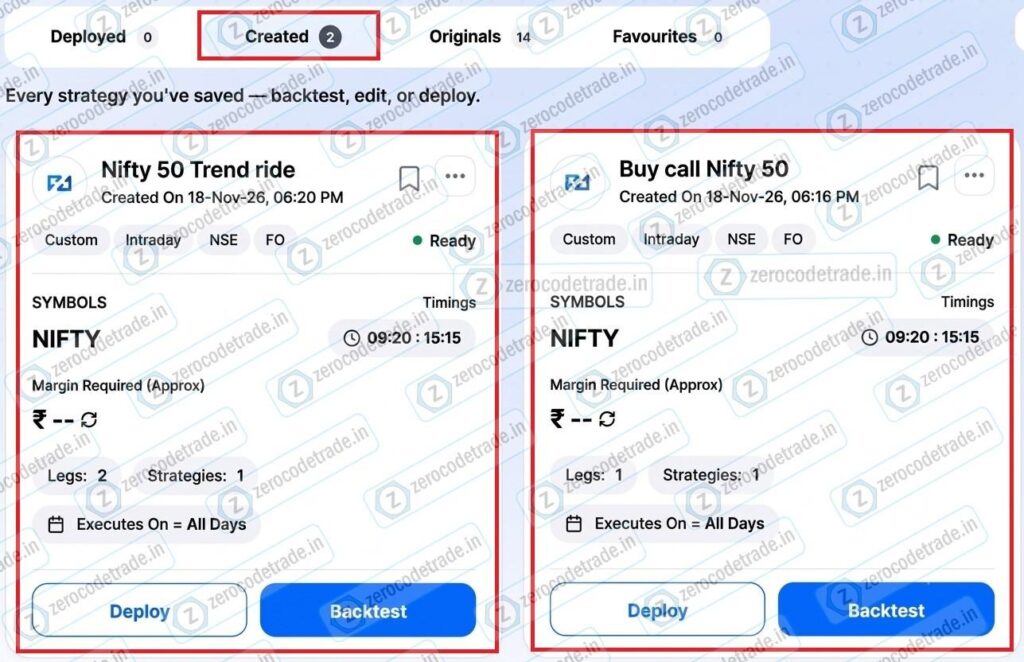
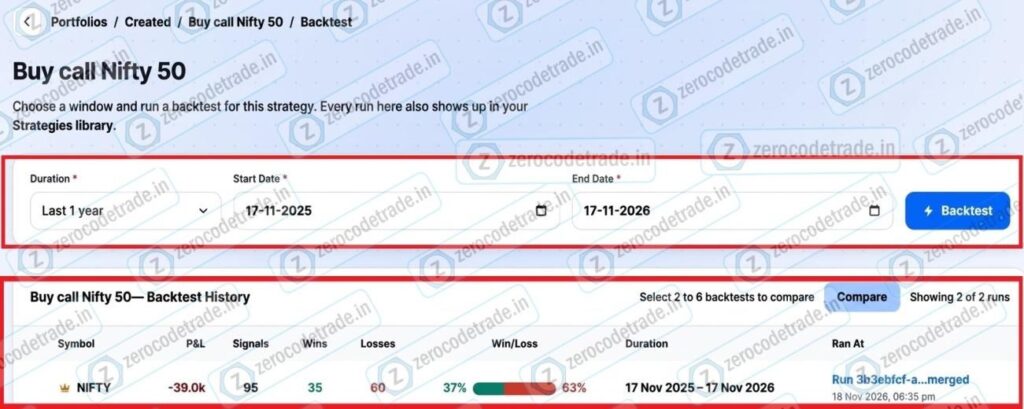
- Return to the left-hand menu, click on Strategies, and open the Created tab. Here, you will find all the custom strategies you have built and saved.
- Locate your strategy card and click the Backtest button to evaluate how your rules would have performed in past market conditions.
- On the backtest configuration screen, choose your preferred historical testing duration—such as 1 Month, 6 Months, 1 Year, or a custom date range—and click Backtest. Within roughly a minute, uTrade Algos generates your complete backtest report, including total P&L, win rate, maximum drawdown, and trade-by-trade logs.
Step 4: Compare with Pre-Built Strategies in “uTrade Originals”
- If you want to benchmark your custom setup—or prefer starting with battle-tested logic—go back to Strategies on the left sidebar and click on Originals.
- Inside uTrade Originals, you will find 14 expert-curated, pre-built strategies (such as Brahmastra Nifty and Brahmastra Sensex) with transparent, white-box logic. For exploring additional automation options and AI-driven solutions, check out our guide on Best AI Tools for Automated Stock Trading Without Coding.
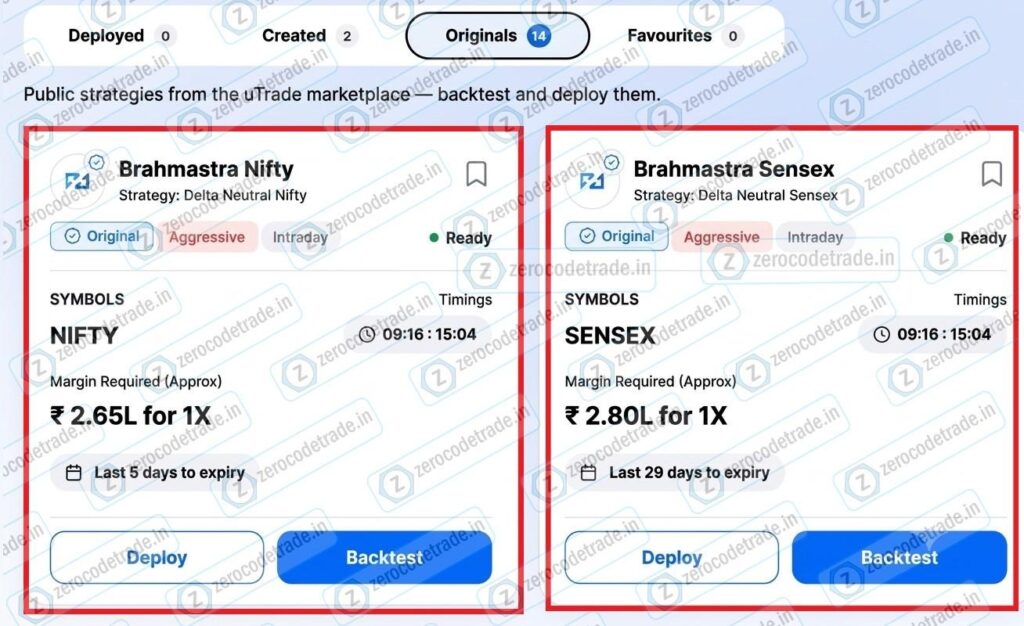
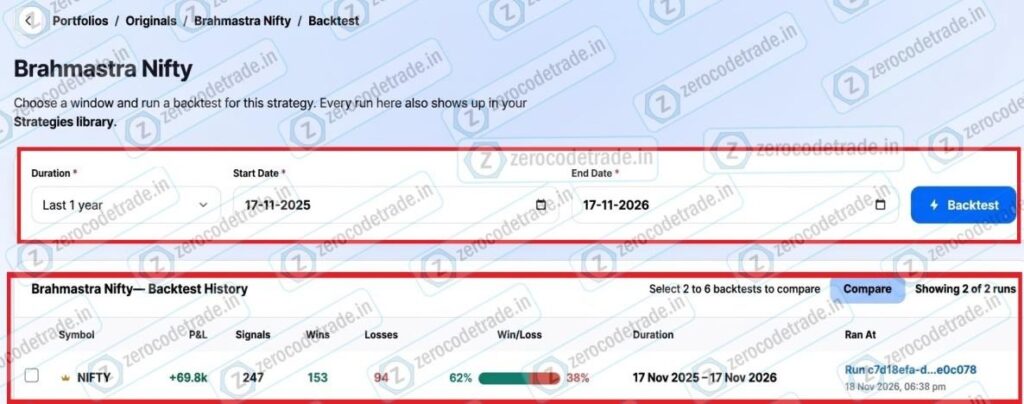
- Run a backtest on any of these pre-existing strategies over the same timeframe and compare its win rate, drawdown, and net return against your custom strategy. This side-by-side comparison makes it easy to decide whether your custom rules or a pre-built uTrade Original fits your risk appetite better.
Step 5: Deploy Your Strategy in Forward Trading (Paper Trading) Mode
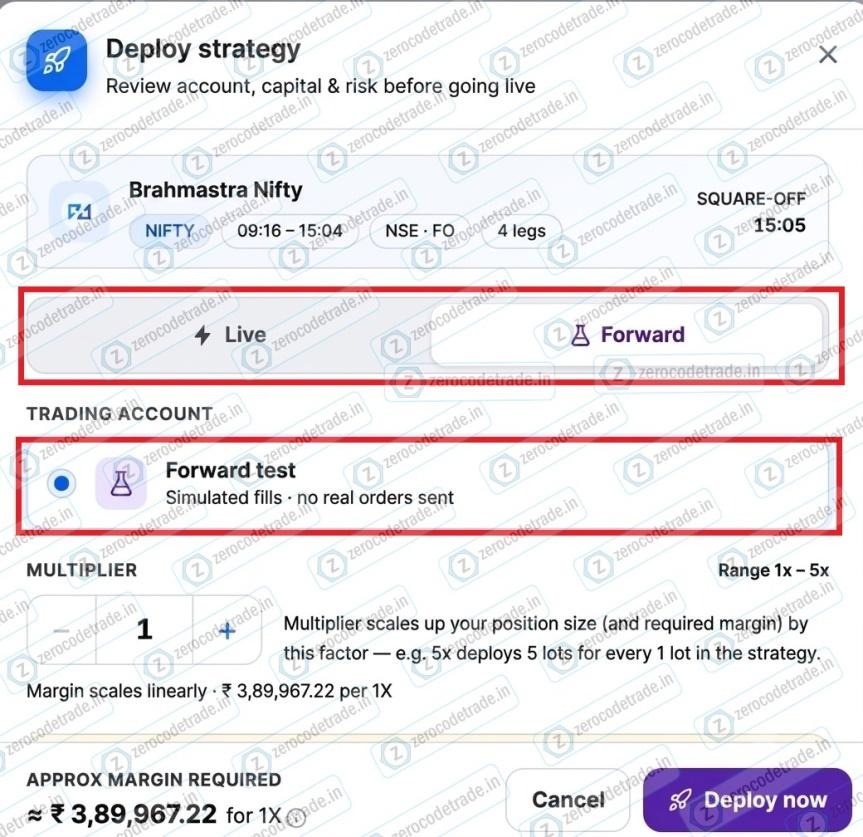
- Once you are satisfied with the historical win rate and drawdown numbers of either your custom strategy or an Original template, click the Deploy button on that strategy.
- In the deployment panel, you will see two clear execution modes: Forward Trading (Paper Trading) and Live Trading.
- Select Forward Trading to begin paper trading. You do not need to link a broker account to run a forward test—uTrade Algos automatically syncs with live NSE and BSE trading hours, tracks real-time price ticks, and simulates your entries, exits, and virtual MTM P&L without risking real money.
Step 6: Connect Your Broker When Ready for Live Market Execution
- After observing consistent simulated profits and reliable signal execution during your forward-testing phase, you can transition to live automation using the exact same workflow.
- Open the Deploy screen and click on Connect a Broker to link your demat/trading account before activating Live mode.
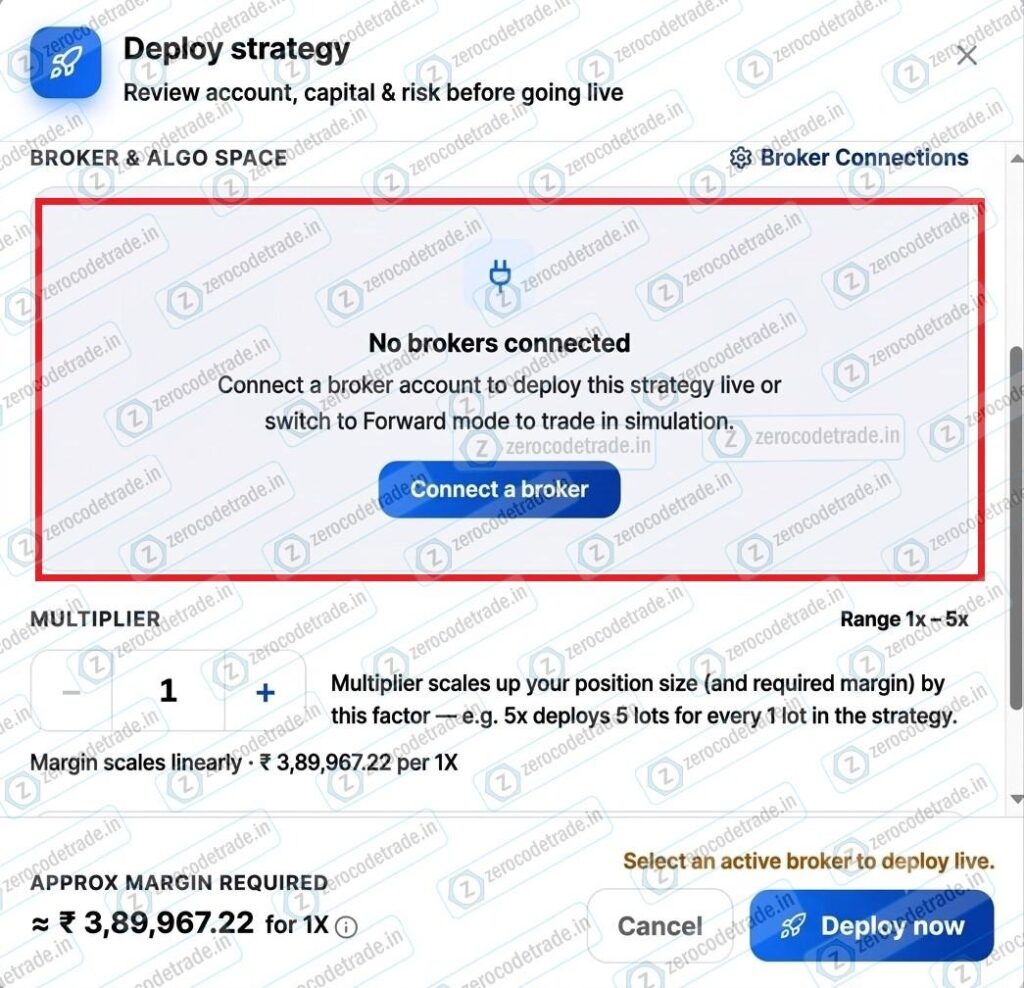
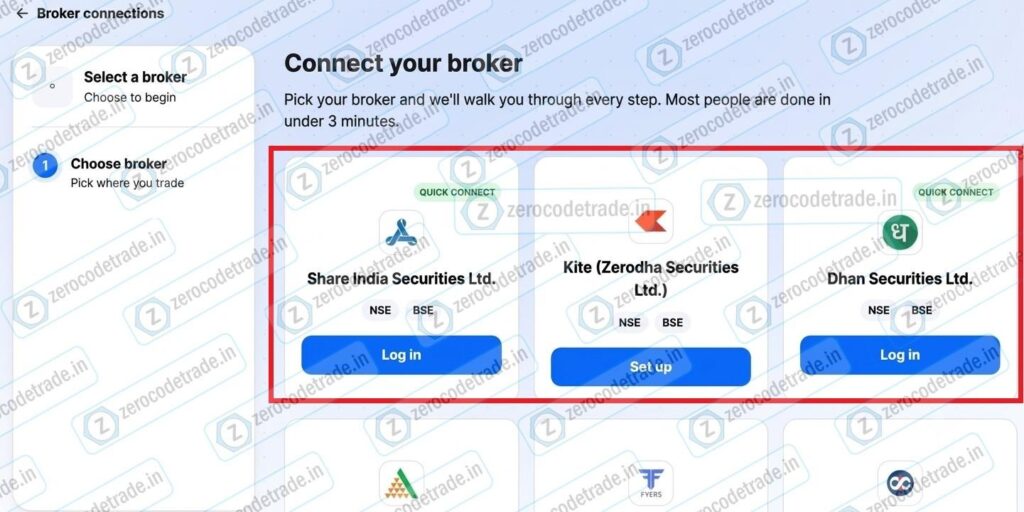
- Choose your preferred Indian broker from the supported list—including Angel One, Dhan, Upstox, Zerodha, and others—complete the API authorization, and switch your deployment mode to Live whenever you are ready to trade with real capital.
AlgoRooms vs. uTradeAlgos: Which One Is Best for Paper Trading?
External tools and platforms referenced for broader research include uTrade Algos, AlgoRooms, Tradetron, and TradingView.
Final Verdict: Which Platform Should You Prefer?
- Choose AlgoRooms if: You want a clean, beginner-friendly, all-in-one no-code dashboard with ready-to-use strategy templates and a simple one-click workflow from backtesting to Forward Deployment without complex setup.
- Choose uTrade Algos if: You want an AI-assisted Strategy Builder alongside 14 white-box uTrade Originals (such as Brahmastra Nifty and Sensex) that let you benchmark pre-built strategies against your custom setups and run standalone Forward Trading during NSE/BSE hours before linking your broker.
Disclaimer
We are here to help you navigate the complex world of 2026 trading technology. While we provide insights on Algo trading, AI trading, AI tools, indicators, platforms, and suggestions, please understand that this is not financial advice, nor is it a recommendation to trade.
Trading involves significant financial risk. Automated tools are meant to assist your workflow, but they do not guarantee profits or provide a “magic button” for income. Always Backtest, Paper Trade, and Start Small to protect your capital.
Limitation of Liability: Zerocodetrade.in and its authors are not responsible for any financial losses, damages, or missed profits that may result from the use of the content, strategies, or third-party tools mentioned in this blog. All trading decisions are made at your own risk.

“Written by Laxmi Narayan — A stock trader since 2021, he has focused on merging traditional technical analysis with modern tools like Grok AI, ChatGPT to simplify and to educate about various trading patterns and styles, Laxmi shares his knowledge and insights for educational and informational purposes only.”